Frequently Asked Questions (FAQ)
- Using DDL, Mylar can't find a comic even though it's there
- Enabling year removal doesn't give me the results I want
- The series is named something different than what mylar says - how can I fix it?
- Mylar can't find a comic with DDL as a provider, even though the comic name, when searched via browser on GetComics.info gives 1 result with a Direct Download link
Searches done by Mylar using DDL iterate over various combinations of the comicname, issue number, year and the book type. Sometimes changing the comic type can make it get snatched and downloaded. For example, from One-Shot to TPB, : Edit Settings --> Force-Type (original:One-Shot) --> TPB. Or sometimes checking Accept all booktype search matches can make it work.

- Why does a search take so long? I have multiple indexers!
All searches with Mylar use iteration, spread one minute apart. Depending on book type selection there can be up to 5 calls per indexer all spread 1 minute apart. This can delay when the indexers in front truly don't have the book, : Mylar will continue until it finds the books on an active indexer or source. This is why sometimes a single good indexer or DC++ Hub will result in not only faster searches but more successful grabs.
- My torrent indexers never seem to find anything.
Torrents are genuinely not a great source for comics packaged in individual issues/books which is what Mylar is searching for outside of DDL. Because of this it's highly recommended unless you're part of a comic specific torrent site : to rely on other sources.
- I'm using Docker for Mylar and my downloads from SABnzb/Air DC++ are not being processed. Please help!
There's three common causes for this.
1.) Permissions are not correct - Mylar when in Docker should have Enforce Permmissions turned off in the Web Interface tab. This allows the host system to handle the permissions, as a file owned by the Mylar conatiner user may not :
be otherwise accessible to other users.
2.)
SAB users A.) Make sure Are Mylar / SABnzbd on separate machines is checked and your SABnzbd Download Directory is set to the location that Mylar sees within the conatiner. For example, if you mounted your downloads in :
/downloads/comics/ for SABnzbd but Mylar sees this as /comics/ you would put /comics/ here.
Air DC++ users B.) Ensure your Downloads Directory is set for the directory that Air DC++ is downloading to as Mylar sees it. Please see example above as it's the same principle just different location for the setting.
3.) This is a SABnzbd specific setting, Mylar Host Override: on the Download Settings page, set this to how Mylar appears to any other device on the network (for example 192.1.0.42:8090 or if a proxy or DNS server is in use for your LAN mylar.domain.com so long as it is traversable to Mylar) and the NZB should send successfully to SABnzbd and be visible to Mylar.
- I selected Year Removal on Edit Settings on my comic, yet it didn't do anything when searching for downloads.
Year Removal only works for print volumes. If it's a non print, usually there's no issue number so it uses the year to help determine if it's provided.
- The ComicVine name of my comic yields no results from DDL. But if I could change the name of the comic it would get a match on DDL
You can use the Alternate Search Name on Edit Settings to set up an alternative name to be used when searching for that issue on DDL. You can have multiple Alternate Search Names by separating each with ##. If you would like one name in particular to be used first above everything else (even the CV name), put !! in front of the name in the Alternate Search Names field.
- My ComicVine API page says Your request rate is fine but Mylar's logs show network errors when tagging issues or refreshing.
ComicVine's API site is kind of confusing, they are measuring multiple things. Where you see the request rate mentioned above, there are various API endpoints shown with how many times you've used each in the last hour. This is far more important than request rate (see below this image shows a fine request rate despite an endpoint being exhausted) to determine whether you have room within your ComicVine API limits.
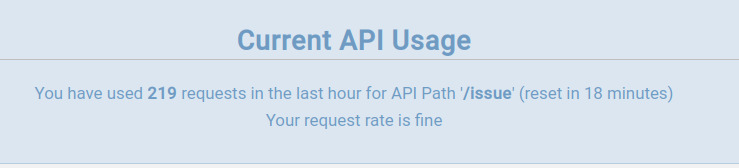
As you can see here, I have used 219 requests from /issue endpoint or resource as it's referred to in the CV documents within an hour. Because of this usage I can expect any individual tags of issues will fail, while other endpoints/resources will operate as expected. Note the word requests if you see a number above 200, this does not mean successfully grabbed data. That's just how many requests over the limit that were tried and failed.
Request Rate - Within the context of ComicVine's API this is measuring your rate velocity across all endpoints, to make this say anything other than fine you need to be hitting multiple endpoints at once (IE refreshing, tagging, and using other scripts because just mylar isn't ever enough to change that wording on its own it simply doesn't request fast enough or with enough endpoints) with dozens of requests within an incredibly short amount of time. This measure is practically useless, and is a holdover from the days of CV's traffic being one of the bigger factors within the former Giant Bomb ecosystem.
There have been reports that requesting too high a velocity of a single endpoint can also trigger the rate response to change and cause API failures, these failures may even be happening without a status page change as ComicVine's API is notoriously inconsistent with behaviors. What you should take is keep requests at a reasonable speed, if you can do 200/hr this works out to doing just over 3 queries a minute per endpoint.
Requests per Endpoint - This is a flat 200 per hour API endpoint. Simple enough, if you've used ComicVine years ago but haven't since, they no longer ignore this limit but now strictly enforce it. A word of warning, querying a new endpoint will reset ALL endpoints' timers so carefully time your manual actions. This appears to be a bug in ComicVine's API which would be fixed on a site that's maintained but alas.
Using the same ComicVine key for multiple apps means they will not be aware of each other's usage, ComicVine's API doesn't provide responses showing that you're rate limited it just fails the transaction.
You can avoid this using a CV Cache just keep in mind the cache(s) are point in time endeavors and are only as updated as their admin's workflow allows. It (they in the future?) however are a reliably fantastic tool for your bulk tagging of books a few months old or more and can save some API headaches when starting with an existing comic collection.
Minor note: If you send the exact same request to CV's API within the same minute, it may not increase your API usage due to Cloudflare's caching setup. Do not expect the API to reflect those calls as they do not actually reach it.